
Retail POS software for shops in Uganda
Barcode selling at full speed with no internet, stock in batches that respect expiry dates, a credit book that actually collects, and wholesale pricing beside retail, from a Kampala arcade counter to an upcountry duka.
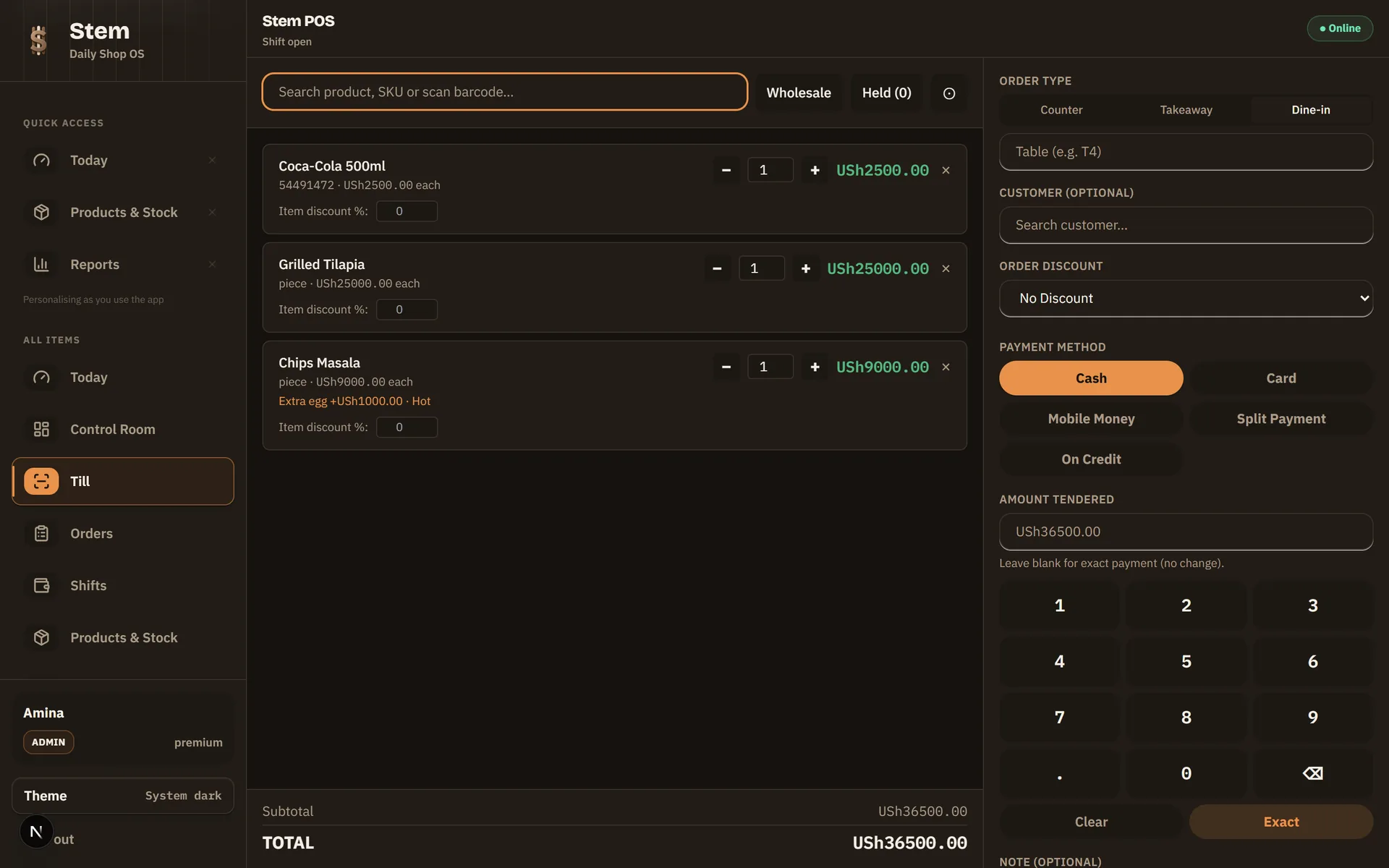
What does a retail POS system do?
A retail POS system is the till, the stock book, the credit notebook and the evening tally in one place. Every sale updates stock and cash on its own, so the questions that eat your evening (what sold, who sold it, who owes what, what is running out) already have answers. Stem does this on the counter itself, so the answers survive a dead network and a power cut.
How do I move my shop onto Stem?
- 1
Register your shop
Create your store, name your branch and set your admin PIN. Registration needs a connection; after the first sign-in Stem POS runs offline.
- 2
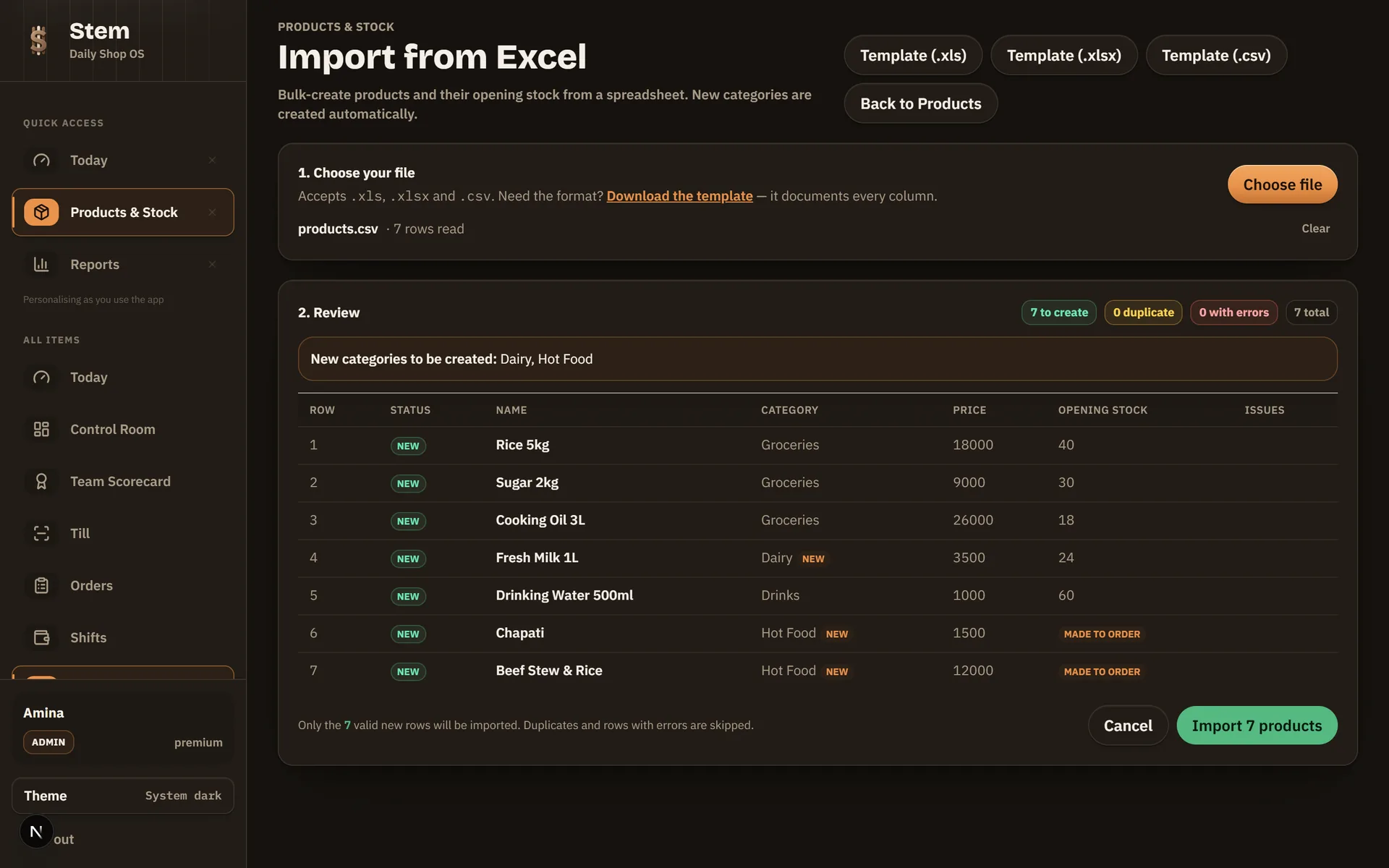
Import your catalogue from Excel
Upload the stock list you already keep, with names, prices, barcodes and quantities, and Stem creates the products and their opening stock in one import.
- 3
Receive stock as batches
Deliveries land as batches with cost, quantity and expiry date. Perishables get scannable batch labels, and Stem POS sells first-expiry-first-out on its own.
- 4
Sell: scan, search, or tap
Barcode scanning, an exact-tender keypad, split payments across cash, card, mobile money and customer credit. All of it at full speed with no internet.
How does serialized (IMEI) stock work?
Serialized stock means every unit is its own record. For a phone dealer, “10 in stock” is not enough. When a customer comes back with a warranty claim, the only question that matters is which phone you sold them. Stem answers it by identity, not by count.
Each unit is scanned in at receiving by serial number or IMEI, with a second IMEI slot for dual-SIM phones.
Selling a serialized product asks which exact unit is leaving: scan the box barcode or pick from the list.
The sold unit is bound to the sale line, so the receipt and the records say which phone went to which customer.
Every unit carries its own status (in stock, sold, returned) so a return brings that specific unit back rather than an anonymous quantity.
Who is serialized stock for?
Phone shops and dealers, electronics sellers, and anyone whose products carry a serial number the customer will one day read back to you. For everything else, such as sodas, sugar and soap, normal batch stock is the right tool, and both live in the same catalogue side by side. You turn it on per product, so nothing changes for the stock you already sell by the crate.
Is your best seller actually your worst margin?
When a staff member adds a product at the counter mid-rush, most tills record what it sells for and nothing about what it cost. Every one of those lines then reports as pure profit, and the day looks better than it was. The lines this happens to are usually the fast-moving ones somebody added in a hurry, which is exactly where the money is.
Stem asks what you paid at the moment you add the product, and shows the profit per unit and the margin as you type. Editing a product later deliberately does not offer it: stock that arrives afterwards costs whatever the purchase order says, and retyping a cost would rewrite margins you have already reported on and closed the books against.
Built for the shop you actually run
Barcode-first selling
Scan factory barcodes or print your own batch labels. The lane keeps moving, and search is there for the items that never had a barcode.
Batches with expiry dates
Stock arrives as batches with cost and expiry. Stem POS sells first-expiry-first-out, flags what is expiring, and records wastage when it happens.
A credit book that collects
Limits per customer, the balance printed on their receipt, repayments taken through Stem POS (even offline) and overdue debts flagged before they go bad.
Wholesale and retail prices
One catalogue, two prices. A sale rung as wholesale charges the wholesale tier, is marked as wholesale on the receipt, and is audited as wholesale.
Branch stock you can trust
Each branch holds its own stock. Transfers are two-phase: dispatched, then counted in, and any variance needs a ruling rather than a shrug.
Returns with a paper trail
Refunds and exchanges settle against the original receipt, with printed slips and every movement recorded back into stock.
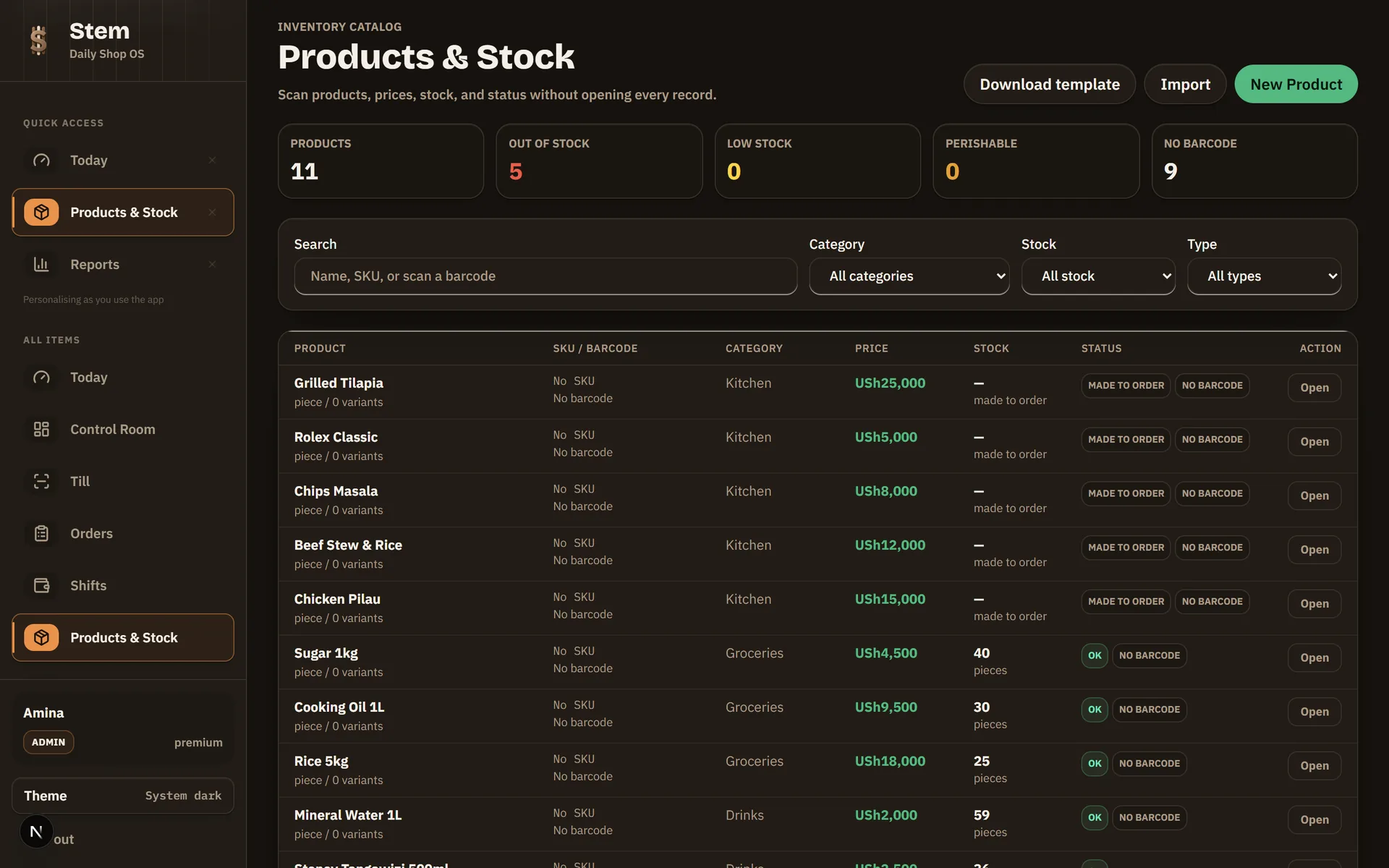
Stock is not a number you typed once. It is the sum of batches that arrived, sold, expired, transferred or were written off, each with a date and a name attached. When the count on the shelf disagrees with the screen, a physical count corrects it and the correction itself is recorded. That is what “stock that tells the truth” means in shillings: shrinkage you can see, priced in USh, with somewhere to look.
The notebook versus Stem
The notebook is free, never crashes and never needs charging, so it deserves a fair fight. The difference is what each one can answer at nine in the evening.
| The question | The notebook | Stem |
|---|---|---|
| What did we sell today? | Add up the lines by hand tonight | A live total, per branch, per cashier |
| Who sold it? | Whoever held the pen | Every sale carries the staff name |
| Who owes us money? | A page of names, some faded | Balances with limits, receipts and repayment history |
| What is about to expire? | Found when a customer complains | Expiry-first selling and an expiring-soon list |
| Which phone did we sell him? | No record beyond the price | The exact IMEI, bound to the sale line |
| Does it work when the internet is down? | Always | Always. Stem POS runs fully offline and syncs later |
The queue does not stop
Stem POS keeps a full copy of your shop on the machine itself: catalogue, prices, customers, credit balances. Scanning, selling, receipts and repayments run at full speed with no connection, and each sale books on the day it really happened once the internet returns.
A sale you have already been paid for is never deleted
If a price changes while Stem POS is offline, the sale still stands. Money a customer has already handed over is never written off because a number moved afterwards. The difference is raised for you to settle instead.
One bad entry cannot hold up everything behind it
We found five days of one shop’s takings sitting on Stem POS because a date had been typed in a format the system could not read, and sales upload in the order they were made. That is fixed: an unreadable date is simply stored as no date, and any single upload that keeps failing is set aside so the rest of the queue moves. It shows up in Sync errors rather than disappearing.
EFRIS is in development
Stem has the settings for URA’s EFRIS system (your TIN, fiscal device and endpoint) and the plumbing built around them, but sales are not yet transmitted to URA. Do not rely on Stem for EFRIS compliance today; keep filing the way you file now. It is opt-in, so a shop that is not EFRIS-registered never sees it, and when the live submission lands it arrives on the Stem POS you already have.
Retail questions, answered
›Does Stem POS really work with no internet?
Yes. Stem POS for Windows keeps a full copy of your catalogue, prices and customers on the machine. Sales, receipts, credit and repayments all work with zero connection, and everything syncs when the internet returns. Registration and the first sign-in are the only steps that need a connection.
›Can I track phones by IMEI?
Yes, on the web today. Mark a product as serialized, scan or paste the consignment in at receiving, and selling asks which exact unit is leaving. That unit is bound to the sale line, so a warranty claim has an answer. Stem POS for Windows gets it in its next over-the-air update.
›How do I get my stock list into Stem?
Import it from Excel. Upload the .xls or .xlsx you already keep, with product names, prices, barcodes and quantities, and Stem creates the catalogue and opening stock in one go. There is no retyping week.
›Can I sell to shops at wholesale prices and walk-ins at retail?
Yes. Each product can carry a wholesale price next to its retail price. A sale rung with the wholesale toggle charges the wholesale tier and is marked as wholesale in the records, so margins stay honest.
›What happens with goods that expire?
Stock is held in batches with expiry dates. Stem POS sells first-expiry-first-out automatically, the dashboard lists what is expiring soon, and anything you throw away is recorded as wastage with its cost.
›Can I run more than one branch?
Yes. Each branch holds its own stock and its own Stem POS devices. Stock moves between branches through verified transfers: dispatched at one end, counted in at the other, with any difference needing an explicit ruling.
›Does it work with EFRIS?
Not yet; EFRIS is in development. Stem holds the settings for your URA TIN, fiscal device and endpoint, but completed sales are not yet transmitted to URA, so please do not rely on Stem for EFRIS compliance today. It is opt-in.
Not there yet? Moving a shop off a paper notebook covers the switch itself, and stopping losses to expired stock covers what batches are actually for.
Close tonight with the numbers already done
Register your shop, import the stock list you already keep, and ring your first sale, online or off.
Page updated 9 August 2026